Kubernetes GitOps with FluxCD - Part 7 - Resource Optimization and Automated Version Management with Github Actions
Table of Contents
In our previous post, we set up push based reconciliation using webhooks. Building on what we’ve learned so far—basic FluxCD setup, SOPS-based secret management, image update automation, Helm chart automation, alerts and push based reconciliation — this article focuses on critical day-two operational concerns: optimizing FluxCD resource allocation and establishing automated version management through Github Actions.
1. Sizing FluxCD Containers
By default, FluxCD components are provisioned with the following resource configurations for CPU and memory:
 1kubectl -n flux-system get pods -o json | jq -r '["container", "cpu_requests", "cpu_limits", "memory_requests", "memory_limits"], (.items[].spec.containers[] | [.image, .resources.requests.cpu, .resources.limits.cpu, .resources.requests.memory, .resources.limits.memory]) | @csv' | column -t -s,
 2
 3
 4"container"                                           "cpu_requests"  "cpu_limits"  "memory_requests"  "memory_limits"
 5"ghcr.io/fluxcd/helm-controller:v1.2.0"               "100m"          "1"           "64Mi"             "1Gi"
 6"ghcr.io/fluxcd/image-automation-controller:v0.40.0"  "100m"          "1"           "64Mi"             "1Gi"
 7"ghcr.io/fluxcd/image-reflector-controller:v0.34.0"   "100m"          "1"           "64Mi"             "1Gi"
 8"ghcr.io/fluxcd/kustomize-controller:v1.5.0"          "100m"          "1"           "64Mi"             "1Gi"
 9"ghcr.io/fluxcd/notification-controller:v1.5.0"       "100m"          "1"           "64Mi"             "1Gi"
10"ghcr.io/fluxcd/source-controller:v1.5.0"             "50m"           "1"           "64Mi"             "1Gi"
For our environment with a smaller cluster footprint, these default limits are unnecessarily generous and could lead to resource contention. We’ll refine these allocations by modifying cluster/default/flux-system/kustomization.yaml to better align with our actual resource capacity and workload requirements:
 1apiVersion: kustomize.config.k8s.io/v1beta1
 2kind: Kustomization
 3resources:
 4  - gotk-components.yaml
 5  - gotk-sync.yaml
 6  - webhook-receiver.yaml
 7  - ingress.yaml
 8patches:
 9  - patch: |-
10      apiVersion: kustomize.toolkit.fluxcd.io/v1
11      kind: Kustomization
12      metadata:
13        name: flux-system
14        namespace: flux-system
15      spec:
16        decryption:
17          provider: sops
18          secretRef:
19            name: sops-gpg
20+ - patch: |
21+     - op: add
22+       path: /spec/template/spec/nodeSelector
23+     - op: replace
24+       path: /spec/template/spec/containers/0/resources/limits/cpu
25+       value: "100m"
26+     - op: replace
27+       path: /spec/template/spec/containers/0/resources/limits/memory
28+       value: "128Mi"
29+   target:
30+     kind: Deployment
After committing these changes, we can verify the resource adjustments have been properly applied:
1kubectl -n flux-system get pods -o json | jq -r '["container", "cpu_requests", "cpu_limits", "memory_requests", "memory_limits"], (.items[].spec.containers[] | [.image, .resources.requests.cpu, .resources.limits.cpu, .resources.requests.memory, .resources.limits.memory]) | @csv' | column -t -s,
2
3"container"                                           "cpu_requests"  "cpu_limits"  "memory_requests"  "memory_limits"
4"ghcr.io/fluxcd/helm-controller:v1.2.0"               "100m"          "100m"        "64Mi"             "128Mi"
5"ghcr.io/fluxcd/image-automation-controller:v0.40.0"  "100m"          "100m"        "64Mi"             "128Mi"
6"ghcr.io/fluxcd/image-reflector-controller:v0.34.0"   "100m"          "100m"        "64Mi"             "128Mi"
7"ghcr.io/fluxcd/kustomize-controller:v1.5.0"          "100m"          "100m"        "64Mi"             "128Mi"
8"ghcr.io/fluxcd/notification-controller:v1.5.0"       "100m"          "100m"        "64Mi"             "128Mi"
9"ghcr.io/fluxcd/source-controller:v1.5.0"             "50m"           "100m"        "64Mi"             "128Mi"
The output confirms our resource constraints have been successfully applied to all FluxCD components, optimizing our cluster’s resource utilization while maintaining operational integrity.
2. Flux Version Updates with Github Actions
Maintaining current versions of infrastructure components is a critical operational responsibility. We can leverage Github Actions to automate the monitoring and updating of FluxCD components by implementing a workflow that periodically checks for new releases and creates pull requests when updates are available.
Let’s establish this automation by creating .github/workflows/update-flux.yaml
 1name: update-flux
 2
 3on:
 4  workflow_dispatch:
 5  schedule:
 6    - cron: "0 0 1 * *"
 7
 8permissions:
 9  contents: write
10  pull-requests: write
11
12jobs:
13  components:
14    runs-on: ubuntu-latest
15    steps:
16      - name: Check out code
17        uses: actions/checkout@v4
18      - name: Setup Flux CLI
19        uses: fluxcd/flux2/action@main
20      - name: Check for updates
21        id: update
22        run: |
23          flux install \
24            --components="source-controller,kustomize-controller,helm-controller,notification-controller" \
25            --components-extra="image-reflector-controller,image-automation-controller" \
26            --export > ./cluster/default/flux-system/gotk-components.yaml
27
28          VERSION="$(flux -v)"
29          echo "flux_version=$VERSION" >> $GITHUB_OUTPUT
30      - name: Create Pull Request
31        uses: peter-evans/create-pull-request@v7
32        with:
33            branch: update-flux
34            commit-message: Update to ${{ steps.update.outputs.flux_version }}
35            title: Update to ${{ steps.update.outputs.flux_version }}
36            body: |
37              ${{ steps.update.outputs.flux_version }}
This workflow will execute either on-demand through manual triggering or automatically on the first day of each month. When new versions of FluxCD components are detected, it generates a pull request with the updated manifests, facilitating a controlled review and deployment process.
--components and --components-extra flags precisely match those used during your initial FluxCD installation as documented in Kubernetes GitOps with FluxCD - Part 1 - Initial Setup.
After pushing these changes to our repository, we can verify the workflow’s effectiveness by manually triggering it:
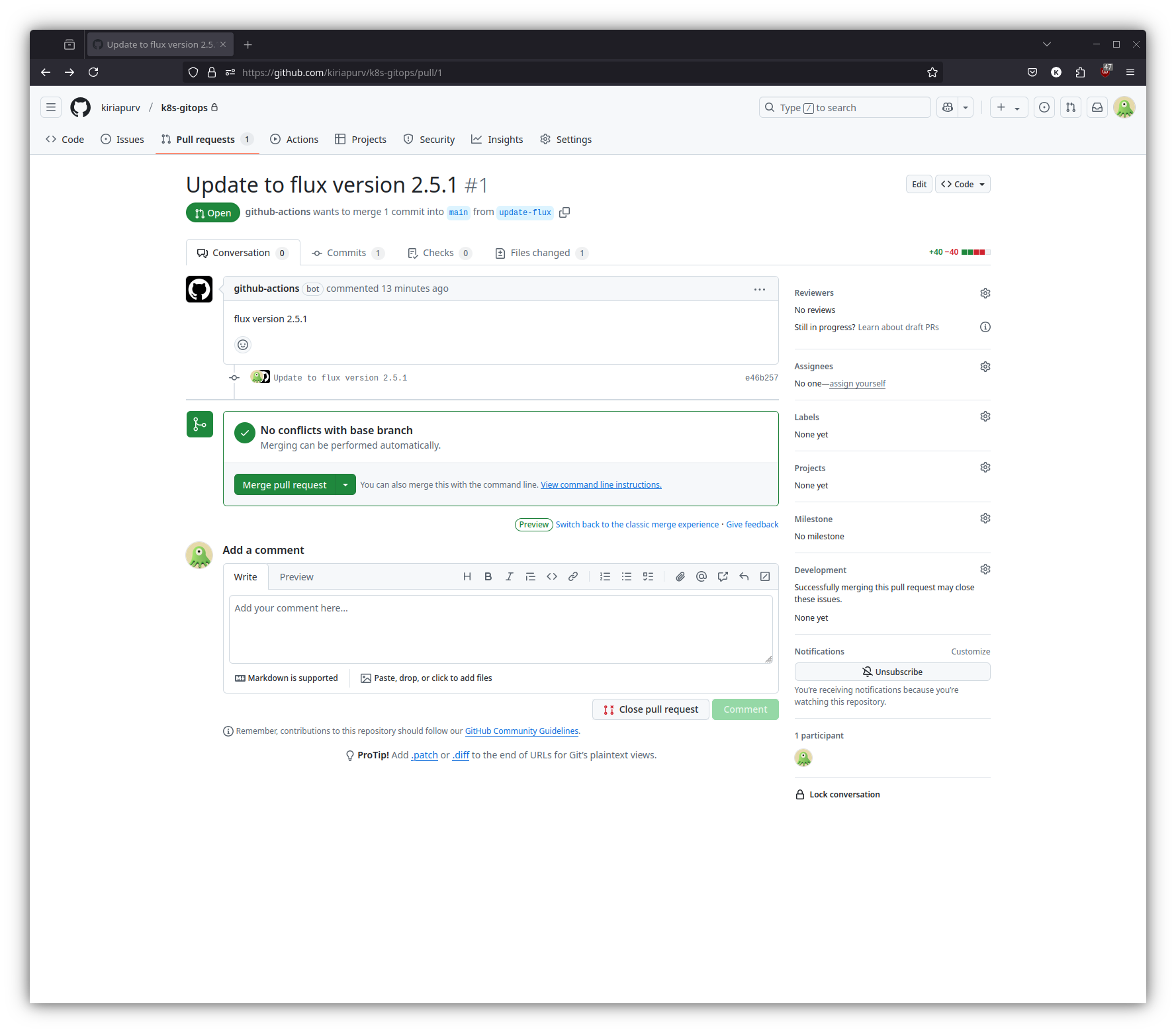
As demonstrated in the screenshot, the workflow has successfully detected and proposed an update to FluxCD version 2.5.1, creating a pull request that can be reviewed and merged through our standard governance process.
References
- Official FluxCD Documentation - https://fluxcd.io/flux/flux-gh-action/
- Kubernetes Documentation - https://kubernetes.io/docs/