Kubernetes GitOps with FluxCD - Part 6 - Push-based Reconciliation with Webhook Receivers
Table of Contents
In our previous post, we set up Discord alerts to get notifications about our cluster’s status. Building on what we’ve learned so far—basic FluxCD setup, SOPS-based secret management, image update automation, Helm chart automation, and alerts—this article focuses on webhook receivers.
By default, FluxCD polls Git repositories at the configured frequency to detect changes. With webhook receivers, your Git provider can notify FluxCD immediately when changes occur, ensuring the reconciliation process doesn’t have to wait for the next scheduled polling interval. This significantly expedites deployments and enhances overall cluster efficiency.
Let’s configure webhook receivers for our Kubernetes cluster.
1. Setup Webhook Secret
First, we’ll generate a cryptographically secure random secret which will be configured in both the FluxCD webhook receiver and GitHub webhooks.
We’ll create cluster/default/github-webhook-token.yaml
1TOKEN=$(openssl rand 24 | sha256sum -b | awk '{print $1}')
2
3kubectl create secret generic github-webhook-token \
4  --namespace=flux-system \
5  --from-literal=token=$TOKEN \
6  --dry-run=client -o yaml > github-webhook-token.yaml
Take note of the TOKEN variable (e.g., using echo $TOKEN) which we’ll later configure in GitHub.
The generated YAML file would look like:
1apiVersion: v1
2kind: Secret
3metadata:
4  name: github-webhook-token
5  namespace: flux-system
6data:
7  token: <base64 encoded token>
Now let’s encrypt this secret with SOPS and publish changes to our Git repository.
Let’s confirm if the secret is created:
1kubectl -n flux-system get secrets
2
3NAME                     TYPE     DATA   AGE
4discord-webhook-secret   Opaque   1      3d20h
5flux-system              Opaque   3      4d21h
6github-webhook-token     Opaque   1      9s
7sops-gpg                 Opaque   1      5d21h
As we can see, the token secret has been successfully created.
2. Setup FluxCD Webhook Receiver
The next step is to configure the webhook receiver in FluxCD.
Let’s define it for our cluster’s flux-system repository.
Create cluster/default/flux-system/webhook-receiver.yaml
 1apiVersion: notification.toolkit.fluxcd.io/v1
 2kind: Receiver
 3metadata:
 4  name: flux-system
 5  namespace: flux-system
 6spec:
 7  type: github
 8  events:
 9    - "ping"
10    - "push"
11  secretRef:
12    name: github-webhook-token
13  resources:
14    - kind: GitRepository
15      name: flux-system
Modify cluster/default/flux-system/kustomization.yaml:
 1apiVersion: kustomize.config.k8s.io/v1beta1
 2kind: Kustomization
 3resources:
 4  - gotk-components.yaml
 5  - gotk-sync.yaml
 6+ - webhook-receiver.yaml
 7patches:
 8  - patch: |-
 9      apiVersion: kustomize.toolkit.fluxcd.io/v1
10      kind: Kustomization
11      metadata:
12        name: flux-system
13        namespace: flux-system
14      spec:
15        decryption:
16          provider: sops
17          secretRef:
18            name: sops-gpg
Let’s push these changes and observe if the webhook receiver is registered:
1flux get receivers
2
3NAME            SUSPENDED       READY   MESSAGE
4flux-system     False           True    Receiver initialized for path: /hook/2524a3ab747c79f26105e00e224d9d212558c1145ad3192ee59e1d6529f0bf0
Take note of the path, which we’ll configure in GitHub.
As we can see, the receiver is successfully initialized and the webhook path is configured.
3. Setup Ingress
So far we have configured the receiver, but GitHub webhooks require a public endpoint for our webhook receiver. Let’s configure an ingress for the flux webhook receiver service.
Create cluster/default/flux-system/ingress.yaml:
 1apiVersion: networking.k8s.io/v1
 2kind: Ingress
 3metadata:
 4  name: webhook-receiver
 5  namespace: flux-system
 6  annotations:
 7    external-dns.alpha.kubernetes.io/target: "XXXXXX"
 8    cert-manager.io/cluster-issuer: "cluster-issuer"
 9spec:
10  tls:
11  - hosts:
12    - flux-wh.XXXXX
13    secretName: flux-ingress-cert
14  rules:
15  - host: flux-wh.XXXX
16    http:
17      paths:
18      - pathType: Prefix
19        path: /
20        backend:
21          service:
22            name: webhook-receiver
23            port:
24              number: 80
25---
26apiVersion: networking.k8s.io/v1
27kind: NetworkPolicy
28metadata:
29  name: allow-acme-issuer
30  namespace: flux-system
31spec:
32  podSelector:
33    matchLabels:
34      acme.cert-manager.io/http01-solver: "true"
35    ingress:
36    - from:
37      - namespaceSelector: {}
38    policyTypes:
39      - Ingress
Since the flux-system namespace implements strict NetworkPolicies, we need to allow our ACME resolver to be reachable through ingress. Hence, we’ve configured an additional NetworkPolicy.
Modify cluster/default/flux-system/kustomization.yaml:
 1apiVersion: kustomize.config.k8s.io/v1beta1
 2kind: Kustomization
 3resources:
 4  - gotk-components.yaml
 5  - gotk-sync.yaml
 6  - webhook-receiver.yaml
 7+ - ingress.yaml
 8patches:
 9  - patch: |-
10      apiVersion: kustomize.toolkit.fluxcd.io/v1
11      kind: Kustomization
12      metadata:
13        name: flux-system
14        namespace: flux-system
15      spec:
16        decryption:
17          provider: sops
18          secretRef:
19            name: sops-gpg
Let’s push these changes and verify if the ingress is operational:
1kubectl -n flux-system get ingress
2
3NAME               CLASS   HOSTS                   ADDRESS                     PORTS     AGE
4webhook-receiver   nginx   flux-wh.XXX   192.168.1.19,192.168.1.24   80, 443   69m
As we can see, the ingress is up and running. Now let’s check if our domain is reachable:
1curl https://flux-wh.XXX
2
3404 page not found
We can successfully reach our webhook endpoint. The 404 response is expected since we’re not hitting a specific webhook path.
4. Setup Github Webhooks
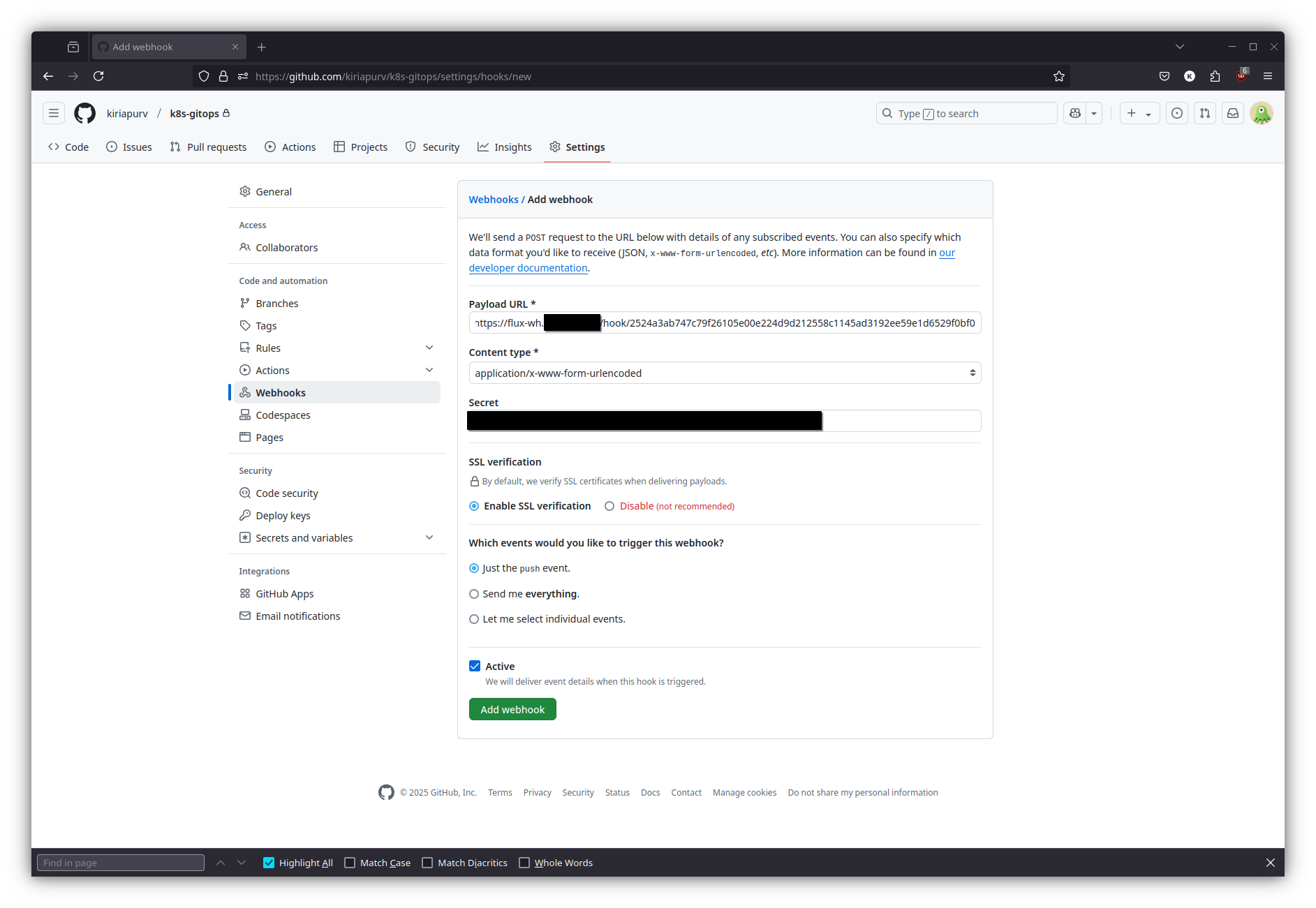
Now let’s use the secret token, endpoint, and webhook path we’ve configured to set up a webhook in GitHub:
5. Verify Setup
Let’s modify our sample app and increase the CPU limits in apps/sample-app/deployment.yaml:
 1apiVersion: apps/v1
 2metadata:
 3  name: sample-app
 4  namespace: default
 5kind: Deployment
 6spec:
 7  replicas: 1
 8  selector:
 9    matchLabels:
10      app: sample-app
11  template:
12    metadata:
13      labels:
14        app: sample-app
15    spec:
16      imagePullSecrets:
17        - name: github-registry-secret
18      containers:
19        - name: sample-app
20          image: ghcr.io/kiriapurv/k8s-sample-app:main-29e96d2a-1740565130 # {"$imagepolicy": "default:sample-app-main-policy"}
21          imagePullPolicy: Always
22          ports:
23            - containerPort: 8080
24          resources:
25            requests:
26              memory: "128Mi"
27              cpu: "50m"
28            limits:
29              memory: "128Mi"
30-             cpu: "50m"
31+             cpu: "150m"
Let’s push our changes and verify if the webhook is working:
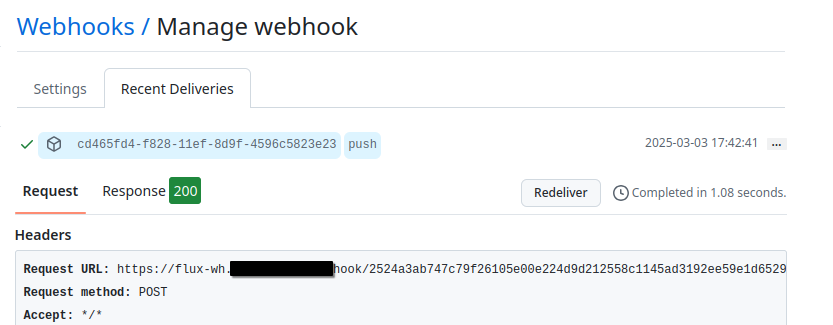
The webhook has been delivered successfully, and reconciliation has been triggered immediately, demonstrating the push-based model in action.
6. Setup Image Repository
We can follow similar steps to set up a webhook for the image repository of our sample app. This ensures that the automated image updates we implemented in Kubernetes GitOps with FluxCD - Part 3 - Automated Image Updates can be instantly reconciled.
For the image repository, here’s the YAML configuration:
 1apiVersion: notification.toolkit.fluxcd.io/v1
 2kind: Receiver
 3metadata:
 4  name: sample-app
 5  namespace: default
 6spec:
 7  type: github
 8  events:
 9    - "ping"
10    - "package"
11  secretRef:
12    name: github-webhook-token
13  resources:
14    - kind: ImageRepository
15      name: sample-app
This configuration listens for package events, which are triggered when new container images are published to the GitHub Container Registry.
What next ?
Future posts will explore advanced GitOps patterns with FluxCD, including:
- Miscellaneous FluxCD Configurations
Stay tuned for each of these topics.
References
- Official FluxCD Documentation - https://fluxcd.io/flux/guides/webhook-receivers/
- GitHub Webhooks Documentation - https://docs.github.com/en/developers/webhooks-and-events/webhooks/about-webhooks
- Kubernetes Documentation - https://kubernetes.io/docs/