Kubernetes GitOps with FluxCD - Part 3 - Automated Image Updates
Table of Contents
In our previous post, we explored how to manage secrets in FluxCD with SOPS. Building on our GitOps foundation from part 1 and secure secrets handling from part 2, this article will focus on image update automation - a powerful FluxCD feature that automatically updates your deployments when new container images are available, maintaining GitOps principles while eliminating manual image version updates.
1. Setup image repository
To demonstrate image automation, we’ll create a sample application using Quarkus, a Kubernetes-native Java framework.
First, let’s create a GitHub repository.
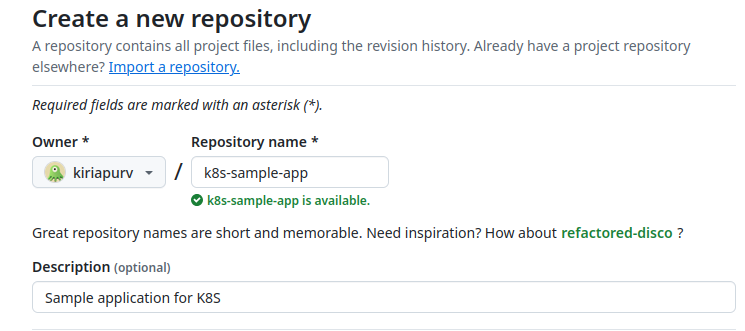
Let’s implement a simple REST controller for our sample application.
 1package com.kiriyard;
 2
 3import jakarta.ws.rs.GET;
 4import jakarta.ws.rs.Path;
 5import jakarta.ws.rs.Produces;
 6import jakarta.ws.rs.core.MediaType;
 7
 8@Path("/")
 9public class K8SampleApplication {
10
11    private static final int VERSION = 1;
12
13    @GET
14    @Produces(MediaType.TEXT_PLAIN)
15    public String index() {
16        return "Greetings From K8S App : Version %d".formatted(VERSION);
17    }
18}
Now, let’s create a GitHub Action workflow that builds and publishes this image to the GitHub Container Registry.
 1name: Build K8S App Image
 2
 3on:
 4  push:
 5    branches:
 6      - main
 7
 8jobs:
 9  build-image:
10    runs-on: ubuntu-latest
11    permissions:
12      contents: read
13      checks: write
14      id-token: write
15      packages: write
16    steps:
17      - name: Checkout code
18        uses: actions/checkout@v4
19
20      - name: Login to GitHub Container Registry
21        uses: docker/login-action@v3
22        with:
23          registry: ghcr.io
24          username: ${{ github.actor }}
25          password: ${{ secrets.GITHUB_TOKEN }}
26
27      - name: Set up JDK 21
28        uses: actions/setup-java@v4
29        with:
30          distribution: temurin
31          java-version: 21
32          cache: 'maven'
33
34      - name: Generate build ID
35        id: prep
36        run: |
37          branch=${GITHUB_REF##*/}
38          sha=${GITHUB_SHA::8}
39          ts=$(date +%s)
40          echo "BUILD_ID=${branch}-${sha}-${ts}" >> $GITHUB_OUTPUT
41
42      - name: Build and push Docker image
43        run: |
44          ./mvnw install \
45            -Dquarkus.container-image.build=true \
46            -Dquarkus.container-image.registry=ghcr.io \
47            -Dquarkus.container-image.group="" \
48            -Dquarkus.container-image.name=${{ github.repository }} \
49            -Dquarkus.container-image.tag=${{ steps.prep.outputs.BUILD_ID }} \
50            -Dquarkus.container-image.push=true
After pushing our changes, we can verify the image has been created in the GitHub Container Registry.
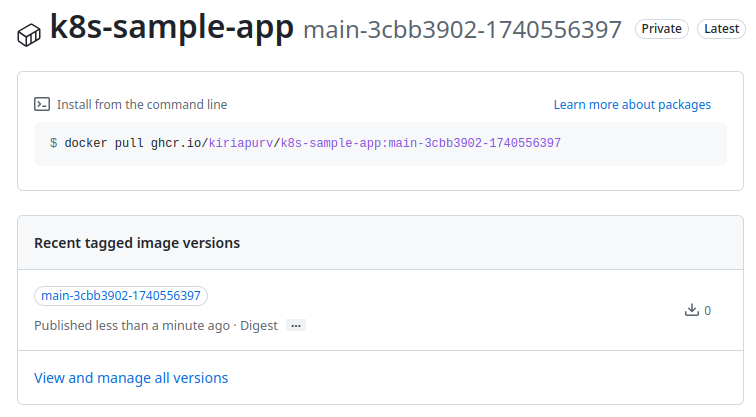
We’ll note the full image path for future reference: ghcr.io/kiriapurv/k8s-sample-app:main-3cbb3902-1740556397
2. Setup private repository pull secrets
Since we’re using a private container registry, we need to configure GitHub authentication credentials as Kubernetes pull secrets for our deployment.
We’ll generate a Personal Access Token (PAT) and configure a Kubernetes secret using SOPS, following the encryption approach we established in our previous post.
First, let’s create the secret YAML manifest:
1kubectl create secret docker-registry github-registry-secret \
2  --docker-server=ghcr.io \
3  --docker-username=** \
4  --docker-password=** \
5  --namespace=default \
6  --dry-run=client -o yaml > github-registry-secret.yaml
Now, let’s encrypt this secret using SOPS:
1sops encrypt --in-place github-registry-secret.yaml
After pushing these changes to our Git repository, we’ll wait for FluxCD to perform reconciliation:
 1flux get kustomizations flux-system --watch
 2
 3NAME            REVISION                SUSPENDED       READY   MESSAGE
 4flux-system     main@sha1:893edbfc      False           True    Applied revision: main@sha1:893edbfc
 5flux-system     main@sha1:893edbfc      False   Unknown Reconciliation in progress
 6flux-system     main@sha1:893edbfc      False   Unknown Reconciliation in progress
 7flux-system     main@sha1:893edbfc      False   Unknown Reconciliation in progress
 8flux-system     main@sha1:893edbfc      False   Unknown Reconciliation in progress
 9flux-system     main@sha1:893edbfc      False   True    Applied revision: main@sha1:c2636b99
10flux-system     main@sha1:c2636b99      False   True    Applied revision: main@sha1:c2636b99
Let’s verify that our secret has been successfully created in the cluster:
1kubectl get secrets
2
3NAME                     TYPE                             DATA   AGE
4github-registry-secret   kubernetes.io/dockerconfigjson   1      65s
5samplesecret             Opaque                           1      20h
3. Create deployment
Now let’s create a Kubernetes deployment using our container image.
First, let’s create apps/sample-app/deployment.yaml
 1apiVersion: apps/v1
 2metadata:
 3  name: sample-app
 4  namespace: default
 5kind: Deployment
 6spec:
 7  replicas: 1
 8  selector:
 9    matchLabels:
10      app: sample-app
11  template:
12    metadata:
13      labels:
14        app: sample-app
15    spec:
16      imagePullSecrets:
17        - name: github-registry-secret
18      containers:
19      - name: sample-app
20        image: ghcr.io/kiriapurv/k8s-sample-app:main-3cbb3902-1740556397
21        imagePullPolicy: Always
22        ports:
23        - containerPort: 8080
24        resources:
25          requests:
26            memory: "128Mi"
27            cpu: "50m"
28          limits:
29            memory: "128Mi"
30            cpu: "50m"
Next, create a Kustomization file to manage our resources at apps/sample-app/kustomization.yaml
1apiVersion: kustomize.config.k8s.io/v1beta1
2kind: Kustomization
3resources:
4  - deployment.yaml
Finally, create a FluxCD Kustomization to deploy our application at cluster/default/sample-app.yaml
 1apiVersion: kustomize.toolkit.fluxcd.io/v1
 2kind: Kustomization
 3metadata:
 4  name: sample-app
 5  namespace: flux-system
 6spec:
 7  interval: 5m
 8  path: ./apps/sample-app
 9  prune: true
10  retryInterval: 2m
11  sourceRef:
12    kind: GitRepository
13    name: flux-system
14  targetNamespace: default
15  timeout: 3m
16  wait: true
After pushing these changes, let’s monitor the FluxCD reconciliation process:
1flux get kustomizations sample-app --watch
2
3NAME            REVISION        SUSPENDED       READY   MESSAGE
4sample-app                      False           Unknown Reconciliation in progress
5sample-app              False   Unknown Reconciliation in progress
6sample-app              False   True    Applied revision: main@sha1:939bb8b3
7sample-app      main@sha1:939bb8b3      False   True    Applied revision: main@sha1:939bb8b3
Let’s verify that our deployment has been created:
1kubectl get pods
2NAME                                READY   STATUS    RESTARTS      AGE
3nginx-deployment-854f6c9499-wxdjx   1/1     Running   1 (11m ago)   45h
4sample-app-9477cc684-fs876          1/1     Running   0             48s
To validate that our application is working correctly, let’s set up port forwarding and test the endpoint:
1kubectl port-forward deployments/sample-app 8080:8080
2Forwarding from 127.0.0.1:8080 -> 8080
3Forwarding from [::1]:8080 -> 8080
Let’s send a request to verify our application is responding:
1curl http://localhost:8080
2
3Greetings From K8S App : Version 1
Perfect! Our application is working as expected.
4. Setup FluxCD Image Automation
Now that we have our application deployed, we’ll configure FluxCD’s image automation capabilities. This requires three key components:
- An ImageRepository resource that monitors our container registry for new images
- An ImagePolicy resource that defines the criteria for selecting new images
- An ImageUpdateAutomation resource that configures the automation process
We’ll configure ImageRepository and ImagePolicy in same cluster/default/sample-app.yaml
 1apiVersion: kustomize.toolkit.fluxcd.io/v1
 2kind: Kustomization
 3metadata:
 4  name: sample-app
 5  namespace: flux-system
 6spec:
 7  interval: 5m
 8  path: ./apps/sample-app
 9  prune: true
10  retryInterval: 2m
11  sourceRef:
12    kind: GitRepository
13    name: flux-system
14  targetNamespace: default
15  timeout: 3m
16  wait: true
17---
18apiVersion: image.toolkit.fluxcd.io/v1beta2
19kind: ImageRepository
20metadata:
21  name: sample-app
22  namespace: default
23spec:
24  image: ghcr.io/kiriapurv/k8s-sample-app
25  interval: 5m
26  secretRef:
27    name: github-registry-secret
28---
29apiVersion: image.toolkit.fluxcd.io/v1beta2
30kind: ImagePolicy
31metadata:
32  name: sample-app-main-policy
33  namespace: default
34spec:
35  imageRepositoryRef:
36    name: sample-app
37  filterTags:
38    pattern: '^main-[a-fA-F0-9]+-(?P<ts>.*)'
39    extract: '$ts'
40  policy:
41    numerical:
42      order: asc
Understanding the ImagePolicy Configuration
The ImagePolicy resource is crucial for defining how FluxCD selects the latest version of an image. Let’s break down its key components:
Tag Filtering with filterTags
The filterTags section uses regular expressions to identify and extract meaningful information from image tags:
-
pattern: Defines a regex pattern to match against image tags. In our case,'^main-[a-fA-F0-9]+-(?P<ts>.*)'means: -
^main-: The tag must start with “main-” -
[a-fA-F0-9]+: Followed by one or more hexadecimal characters (our Git commit SHA) -
(?P<ts>.*): Captures the remaining part of the tag as a named group “ts” (timestamp) -
extract: Specifies which part of the pattern to extract for version comparison. The'$ts'refers to the named capture group"ts"from our pattern, which contains the Unix timestamp.
This extraction is essential because the FluxCD automation needs to know which part of the tag contains the version information to compare.
Version Selection with policy
The policy section defines how FluxCD determines which image version is the “latest”:
-
numerical: Indicates we’re dealing with numeric versioning (as opposed to semantic versioning) -
order: asc: Specifies that higher numbers are considered newer (ascending order)
In our case, we’re using Unix timestamps in our image tags, which naturally increase over time. By setting order: asc, we ensure that FluxCD selects the image with the most recent timestamp.
More details on sortable image tag is available in official documentation - https://fluxcd.io/flux/guides/sortable-image-tags/
Next, we need to annotate our deployment manifest to indicate which image policy should be applied. Let’s update
We’ll update apps/sample-app/deployment.yaml
 1apiVersion: apps/v1
 2metadata:
 3  name: sample-app
 4  namespace: default
 5kind: Deployment
 6spec:
 7  replicas: 1
 8  selector:
 9    matchLabels:
10      app: sample-app
11  template:
12    metadata:
13      labels:
14        app: sample-app
15    spec:
16      imagePullSecrets:
17        - name: github-registry-secret
18      containers:
19      - name: sample-app
20        image: ghcr.io/kiriapurv/k8s-sample-app:main-3cbb3902-1740556397 # {"$imagepolicy": "default:sample-app-main-policy"}
21        imagePullPolicy: Always
22        ports:
23        - containerPort: 8080
24        resources:
25          requests:
26            memory: "128Mi"
27            cpu: "50m"
28          limits:
29            memory: "128Mi"
30            cpu: "50m"
Note that we’ve added a special comment annotation after the image value: # {"$imagepolicy": “default:sample-app-main-policy”}.
This tells FluxCD which policy to use when determining image updates.
Finally, we need to create an ImageUpdateAutomation resource to orchestrate the update process.
Let’s create cluster/default/image-update-automation.yaml:
 1apiVersion: image.toolkit.fluxcd.io/v1beta2
 2kind: ImageUpdateAutomation
 3metadata:
 4  name: default-image-update
 5  namespace: default
 6spec:
 7  interval: 30m
 8  sourceRef:
 9    kind: GitRepository
10    name: flux-system
11    namespace: flux-system
12  git:
13    checkout:
14      ref:
15        branch: main
16    commit:
17      author:
18        email: [email protected]
19        name: fluxcdbot
20      messageTemplate: '{{range .Changed.Changes}}{{print .OldValue}} -> {{println .NewValue}}{{end}}'
21    push:
22      branch: main
23  update:
24    path: ./
25    strategy: Setters
This configuration tells FluxCD to:
- Check for updates every 30 minutes
- Commit changes using the FluxCD bot identity
- Use a message template that shows which images were updated
- Push changes to the main branch
- Use the “Setters” strategy to update image references throughout the repository
Let’s push these changes and monitor FluxCD events to verify our automation is working:
1flux events -n default --watch
2LAST SEEN               TYPE    REASON                  OBJECT                                  MESSAGE
331s (x24 over 2m38s)    Warning DependencyNotReady      ImagePolicy/sample-app-main-policy      referenced ImageRepository has not been scanned yet
430s (x2 over 30s)       Normal  Succeeded       ImagePolicy/sample-app-main-policy      Latest image tag for 'ghcr.io/kiriapurv/k8s-sample-app' resolved to main-3cbb3902-1740556397
530s     Normal  Succeeded       ImageRepository/sample-app      successful scan: found 1 tags
Let’s confirm that our image resources are properly configured:
1flux get -n default images all
2NAME                            LAST SCAN                       SUSPENDED       READY   MESSAGE
3imagerepository/sample-app      2025-02-26T14:08:00+05:30       False           True    successful scan: found 1 tags
4
5NAME                                    LATEST IMAGE                                                    READY   MESSAGE
6imagepolicy/sample-app-main-policy      ghcr.io/kiriapurv/k8s-sample-app:main-3cbb3902-1740556397       True    Latest image tag for 'ghcr.io/kiriapurv/k8s-sample-app' resolved to main-3cbb3902-1740556397
5. Updating Image
Now let’s test our automation by updating our application code and pushing the change.
We’ll increment the version number in our controller class:
 1package com.kiriyard;
 2
 3import jakarta.ws.rs.GET;
 4import jakarta.ws.rs.Path;
 5import jakarta.ws.rs.Produces;
 6import jakarta.ws.rs.core.MediaType;
 7
 8@Path("/")
 9public class K8SampleApplication {
10
11-    private static final int VERSION = 1;
12+    private static final int VERSION = 2;
13
14    @GET
15    @Produces(MediaType.TEXT_PLAIN)
16    public String index() {
17        return "Greetings From K8S App : Version %d".formatted(VERSION);
18    }
19}
After committing and pushing this change, GitHub Actions will build a new container image. Once the image is published, FluxCD should detect it, update our Git repository, and then apply the changes to our cluster. Let’s monitor the FluxCD events:
1flux -n default events
2
36s                      Normal  Succeeded               ImageUpdateAutomation/default-image-update      pushed commit '91fce99' to branch 'main'
4                                                                                                        ghcr.io/kiriapurv/k8s-sample-app:main-3cbb3902-1740556397 -> ghcr.io/kiriapurv/k8s-sample-app:main-29e96d2a-1740565130
We can also verify the changes in our Git repository:
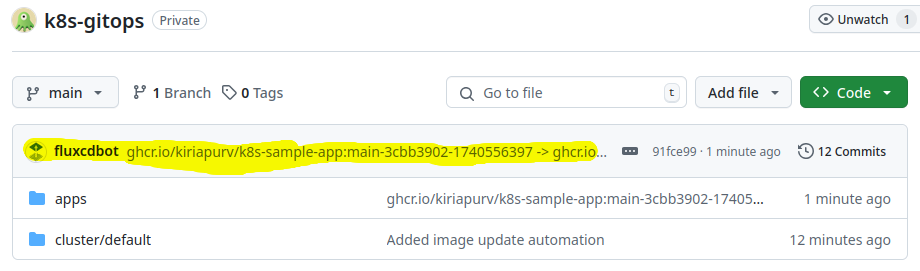
Now let’s check if the deployment in our cluster has been updated:
 1kubectl -n default describe pod sample-app-649d676845-gcpwk
 2Name:             sample-app-649d676845-gcpwk
 3Namespace:        default
 4Priority:         0
 5Service Account:  default
 6Node:             192.168.1.19/192.168.1.19
 7Start Time:       Wed, 26 Feb 2025 16:18:50 +0530
 8Labels:           app=sample-app
 9                  pod-template-hash=649d676845
10Annotations:      <none>
11Status:           Running
12IP:               10.42.0.15
13IPs:
14  IP:           10.42.0.15
15Controlled By:  ReplicaSet/sample-app-649d676845
16Containers:
17  sample-app:
18    Container ID:   containerd://c505519d6dd3d013fa2be3275e2b5085df4486a4c3ebe75a50688b37e49eb7ff
19    Image:          ghcr.io/kiriapurv/k8s-sample-app:main-29e96d2a-1740565130
20    Image ID:       ghcr.io/kiriapurv/k8s-sample-app@sha256:8447a6a128b96474ee620dfc692c15d7c22309f973663917191d2b87b8f3db72
21    Port:           8080/TCP
22    Host Port:      0/TCP
23    State:          Running
24      Started:      Wed, 26 Feb 2025 16:18:57 +0530
25    Ready:          True
26    Restart Count:  0
27    Limits:
28      cpu:     50m
29      memory:  128Mi
30    Requests:
31      cpu:        50m
32      memory:     128Mi
33    Environment:  <none>
34    Mounts:
35      /var/run/secrets/kubernetes.io/serviceaccount from kube-api-access-l2rxk (ro)
36Conditions:
37  Type                        Status
38  PodReadyToStartContainers   True
39  Initialized                 True
40  Ready                       True
41  ContainersReady             True
42  PodScheduled                True
43Volumes:
44  kube-api-access-l2rxk:
45    Type:                    Projected (a volume that contains injected data from multiple sources)
46    TokenExpirationSeconds:  3607
47    ConfigMapName:           kube-root-ca.crt
48    ConfigMapOptional:       <nil>
49    DownwardAPI:             true
50QoS Class:                   Guaranteed
51Node-Selectors:              <none>
52Tolerations:                 node.kubernetes.io/not-ready:NoExecute op=Exists for 300s
53                             node.kubernetes.io/unreachable:NoExecute op=Exists for 300s
54Events:
55  Type    Reason     Age    From               Message
56  ----    ------     ----   ----               -------
57  Normal  Scheduled  4m42s  default-scheduler  Successfully assigned default/sample-app-649d676845-gcpwk to 192.168.1.19
58  Normal  Pulling    4m41s  kubelet            Pulling image "ghcr.io/kiriapurv/k8s-sample-app:main-29e96d2a-1740565130"
59  Normal  Pulled     4m35s  kubelet            Successfully pulled image "ghcr.io/kiriapurv/k8s-sample-app:main-29e96d2a-1740565130" in 5.3s (5.3s including waiting). Image size: 166698164 bytes.
60  Normal  Created    4m35s  kubelet            Created container sample-app
61  Normal  Started    4m35s  kubelet            Started container sample-app
As we can see, the pod is now running with the new image tag: main-29e96d2a-1740565130.
Finally, let’s test our application to confirm the version has been updated:
1curl http://localhost:8080
2
3Greetings From K8S App : Version 2
Success! Our application has been automatically updated to version 2, demonstrating the complete GitOps-based image automation flow with FluxCD.
What next ?
Future posts will explore advanced GitOps patterns with FluxCD, including:
- Helm chart automation
- Notification and alerting configuration
Stay tuned for each of these topics.
References
- Official FluxCD Documentation - https://fluxcd.io/flux/guides/image-update/
- GitOps Working Group - https://opengitops.dev
- Kubernetes Documentation - https://kubernetes.io/docs/
- Quarkus Container Image Guide - https://quarkus.io/guides/container-image